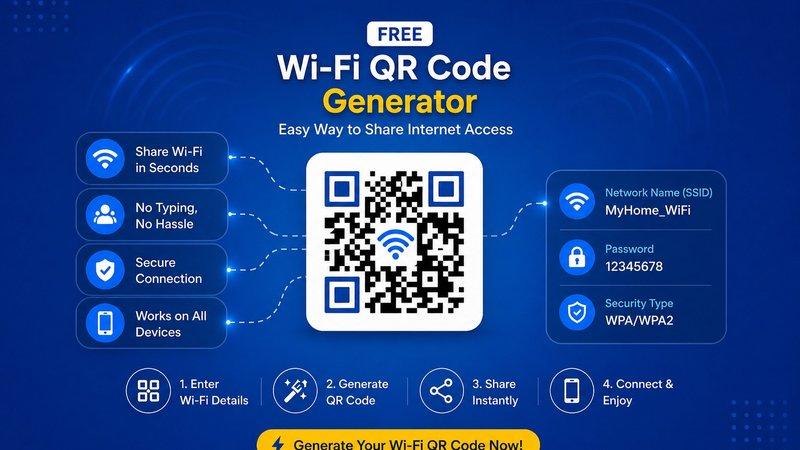
In today’s digital world, fast and easy internet access is essential for homes, offices, cafes, restaurants, hotels, and public places. People expect quick Wi-Fi access without the hassle of typing long passwords. This is where a Free Wi-Fi QR Code Generator becomes extremely useful.
A Wi-Fi QR code allows users to connect to your wireless network instantly by simply scanning the code with their smartphone. No need to manually enter the network name or password. It saves time, improves user experience, and adds a professional touch to your business or personal space.
If you are looking for a simple and reliable way to create one, QR Code Creator offers an easy and secure solution to generate your Wi-Fi QR code for free.
Also Read: Free UPI QR Code Generator Online – Digital Inspiration for Easy Payments
What is a Free Wi-Fi QR Code Generator?
A Free Wi-Fi QR Code Generator is a tool that helps you create a scannable QR code containing your Wi-Fi network details, such as:
- Wi-Fi Network Name (SSID)
- Password
- Security Type (WPA/WPA2, WEP, or Open Network)
When users scan the QR code, their phone automatically connects to the Wi-Fi network without manual setup.
This is especially useful for businesses that want to provide smooth customer service and better convenience.
Also read: Best Free QR Code Generator: Why It Matters in 2026
Why Use a Free Wi-Fi QR Code Generator?
Using a Wi-Fi QR code offers several practical benefits for both personal and business use.
1. Quick and Easy Connection
Users can connect instantly without typing long passwords manually.
2. Better Customer Experience
Restaurants, cafes, salons, and hotels can improve customer satisfaction with fast internet access.
3. Saves Time
No need to repeatedly share passwords with guests or customers.
4. Reduces Typing Errors
Typing complex Wi-Fi passwords often leads to mistakes. QR codes solve this problem.
5. Professional and Modern Look
Displaying a branded Wi-Fi QR code gives your business a smart and modern appearance.
Also Read: How To Create Your Own QR Code? A Step-by-Step Guide for 2026!
Where Can You Use Wi-Fi QR Codes?
A Wi-Fi QR code is useful in many places:
For Businesses
- Cafes and Restaurants
- Hotels and Resorts
- Offices and Workspaces
- Retail Stores
- Salons and Clinics
For Personal Use
- Home Guest Access
- House Parties
- Family Events
- Airbnb Rentals
- Study Rooms
It makes internet sharing simple and hassle-free.
Also Read: Free vCard QR Code Generator: Create Digital Business Cards in 2026
How to Create a Free Wi-Fi QR Code
Creating a Wi-Fi QR code is very simple and takes only a few steps.
Step 1: Enter Your Wi-Fi Name
Add your Wi-Fi network name (SSID).
Step 2: Enter Your Password
Type your Wi-Fi password correctly.
Step 3: Select Security Type
Choose your security type like WPA/WPA2, WEP, or no password.
Step 4: Generate QR Code
Click the generate button to create your Wi-Fi QR code instantly.
Step 5: Download and Print
Download the QR code and place it where users can scan it easily.
With QR Code Creator, the entire process is fast, free, and user-friendly.
Also Read: Are Self Hosted QR Code Generators Worth It in 2026?
Benefits of Using QR Code Creator
Choosing the right platform matters when creating QR codes. QR Code Creator provides a simple and trusted solution for generating Wi-Fi QR codes.
Key Features Include:
- Free QR code generation
- Fast and secure process
- High-quality downloadable files
- Mobile-friendly scanning
- No technical skills required
- Easy customization options
- Professional and clean design
This makes it perfect for both businesses and individuals.
Also Read: How to Use QR Code on Prescription to Guide Patients
Tips for Better Wi-Fi QR Code Usage
To get the best results from your Wi-Fi QR code, follow these helpful tips:
Keep It Visible
Place the QR code where guests can easily see it, like tables, reception desks, walls, or menus.
Use Clear Printing
Always print in high quality so the QR code scans quickly.
Add Instructions
Include simple text like “Scan to Connect to Wi-Fi” for better understanding.
Keep Your Password Updated
If you change your Wi-Fi password, update your QR code immediately.
Add Branding
Businesses can add logos or branded designs for a professional look.
Also Read: How to Use QR Code on Prescription to Guide Patients
Why Businesses Prefer Wi-Fi QR Codes
Businesses today focus on customer convenience. Offering free and easy Wi-Fi access improves customer satisfaction and encourages longer visits.
For example:
- Customers stay longer in cafes
- Hotel guests enjoy smoother check-ins
- Office visitors connect faster
- Waiting areas feel more comfortable
This small improvement creates a better overall customer experience.
Also Read: Create QR Code for PDF Free – Easy, Fast & Secure Guide
Conclusion
A Free Wi-Fi QR Code Generator is one of the easiest ways to simplify internet access for customers, guests, and visitors. It saves time, improves convenience, reduces password-sharing issues, and adds a professional touch.
Whether you own a business or simply want easier guest Wi-Fi access at home, using a Wi-Fi QR code is a smart solution.
With QR Code Creator, you can generate secure, fast, and professional Wi-Fi QR codes for free in just a few minutes.
Start today and make Wi-Fi access easier for everyone.
FAQs – Free Wi-Fi QR Code Generator
1. What is a Wi-Fi QR Code?
A Wi-Fi QR code is a scannable code that stores your Wi-Fi network details like network name, password, and security type for instant connection.
2. Is it free to create a Wi-Fi QR code?
Yes, with QR Code Creator, you can generate a Wi-Fi QR code completely free of cost.
3. Can I use a Wi-Fi QR code for my business?
Yes, Wi-Fi QR codes are perfect for cafes, hotels, offices, restaurants, salons, and stores to offer easy customer internet access.
4. Do users need a special app to scan the QR code?
Most modern smartphones can scan QR codes directly using the camera app without needing an extra app.
5. What happens if I change my Wi-Fi password?
If your password changes, you will need to create a new Wi-Fi QR code with the updated details.