In today’s digital age, connecting your audience to your social media pages quickly is essential for business growth. One of the easiest and most effective ways to do this is by using a QR code for your Facebook page. With just a quick scan, users can instantly visit your page, follow you, or engage with your content.
If you’re wondering how to get a QR code for your Facebook page, this guide will walk you through everything in a simple and user-friendly way.
Also Read: Dynamic QR Code for YouTube – Smarter Video Sharing Made Easy
What is a QR Code for Facebook Page?
A QR code for a Facebook page is a scannable code that redirects users directly to your page. Instead of typing long URLs or searching manually, users can simply scan the code and reach your page instantly.
Why It Matters:
- Saves time for users
- Increases page visits and followers
- Enhances marketing efforts
- Creates a seamless user experience
Also Read: Create QR Code with Logo – Build Trust, Branding & Higher Engagement
Benefits of Using QR Code for Facebook Page
Using a QR code can significantly boost your online presence and engagement.
Key Benefits:
- Instant Access: One scan and users land on your page
- Boost Followers: Easier access leads to more likes and follows
- Better Engagement: Encourage users to interact with your posts
- Cost-Effective Marketing: No extra cost for promotion
- Offline to Online Connection: Perfect for print materials
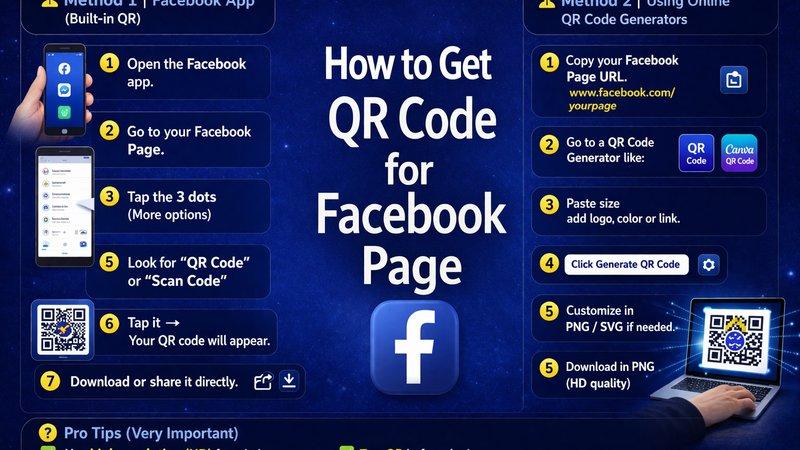
How to Get QR Code for Facebook Page (Step-by-Step)
Follow these simple steps to create your QR code:
Step 1: Copy Your Facebook Page URL
- Open your Facebook page
- Copy the page link from the browser
Step 2: Use a QR Code Generator
Choose a reliable tool like QR Code Creator to generate your QR code easily.
Step 3: Paste Your URL
- Paste your Facebook page link into the generator
- Select the type (URL QR code)
Step 4: Customize Your QR Code
Make your QR code more attractive:
- Add colors
- Include your logo
- Choose a design that matches your brand
Step 5: Download and Use
- Download your QR code in high resolution
- Use it across marketing platforms
Also Read: How Businesses Use QR Code Tracking to Increase Conversions
Where to Use Your Facebook QR Code
To maximize results, place your QR code where people can easily scan it.
Best Places to Use:
- Business cards
- Flyers and brochures
- Product packaging
- Store displays
- Website and email signatures
Tips to Make Your QR Code More Effective
Creating a QR code is easy, but making it effective requires smart strategies.
Pro Tips:
- ✔️ Add a clear call-to-action (e.g., “Scan to Follow Us”)
- ✔️ Keep the design simple and scannable
- ✔️ Use high-resolution images
- ✔️ Test your QR code before printing
- ✔️ Track performance using dynamic QR codes
Also Read: Why Your Restaurant’s Paper Menu Is Costing You Money
Why Choose QR Code Creator?
If you want a reliable and easy way to generate QR codes, QR Code Creator is a great choice. It offers:
- Simple and user-friendly interface
- High-quality downloadable QR codes
- Customization options
- Fast and secure generation
This makes it ideal for businesses, marketers, and individuals looking to grow their Facebook presence.
Also Read: How to Create a QR Code That Actually Gets Scanned
Common Mistakes to Avoid
Avoid these mistakes to get the best results:
- Using low-quality QR codes
- Not testing before sharing
- Placing QR codes in hard-to-scan areas
- Not adding instructions or CTA
Conclusion
Getting a QR code for your Facebook page is one of the simplest and most effective ways to increase your online visibility and engagement. It allows users to connect with your page instantly, improving your chances of gaining followers and growing your brand.
By following the steps and tips mentioned above, you can easily create and use QR codes to enhance your marketing strategy. Start today and make it easier for people to discover and engage with your Facebook page.
Also Read: QR Codes for Education: Smarter Learning Made Simple
FAQs
- Is it free to create a QR code for a Facebook page?
Yes, many tools offer free QR code generation, but advanced features may require payment.
2. Can I customize my Facebook QR code?
Yes, you can add colors, logos, and design elements to match your brand.
3. Where should I use my QR code?
You can use it on business cards, posters, packaging, and digital platforms.
4. Do QR codes expire?
Static QR codes do not expire, but dynamic QR codes may depend on the platform.
5. How do I know if my QR code is working?
Always test your QR code before using it and consider tools that provide scan tracking.